THE DOCKA home for your
A home for your
everyday apps.
Your pinned favorites, running apps, and folders. Together, within reach.
FAMILIAR ON THE OUTSIDEWINDOWS UNDERNEATH
All the possibilities of your PC.
A little more like home.
Moving to Windows shouldn’t mean starting from zero.
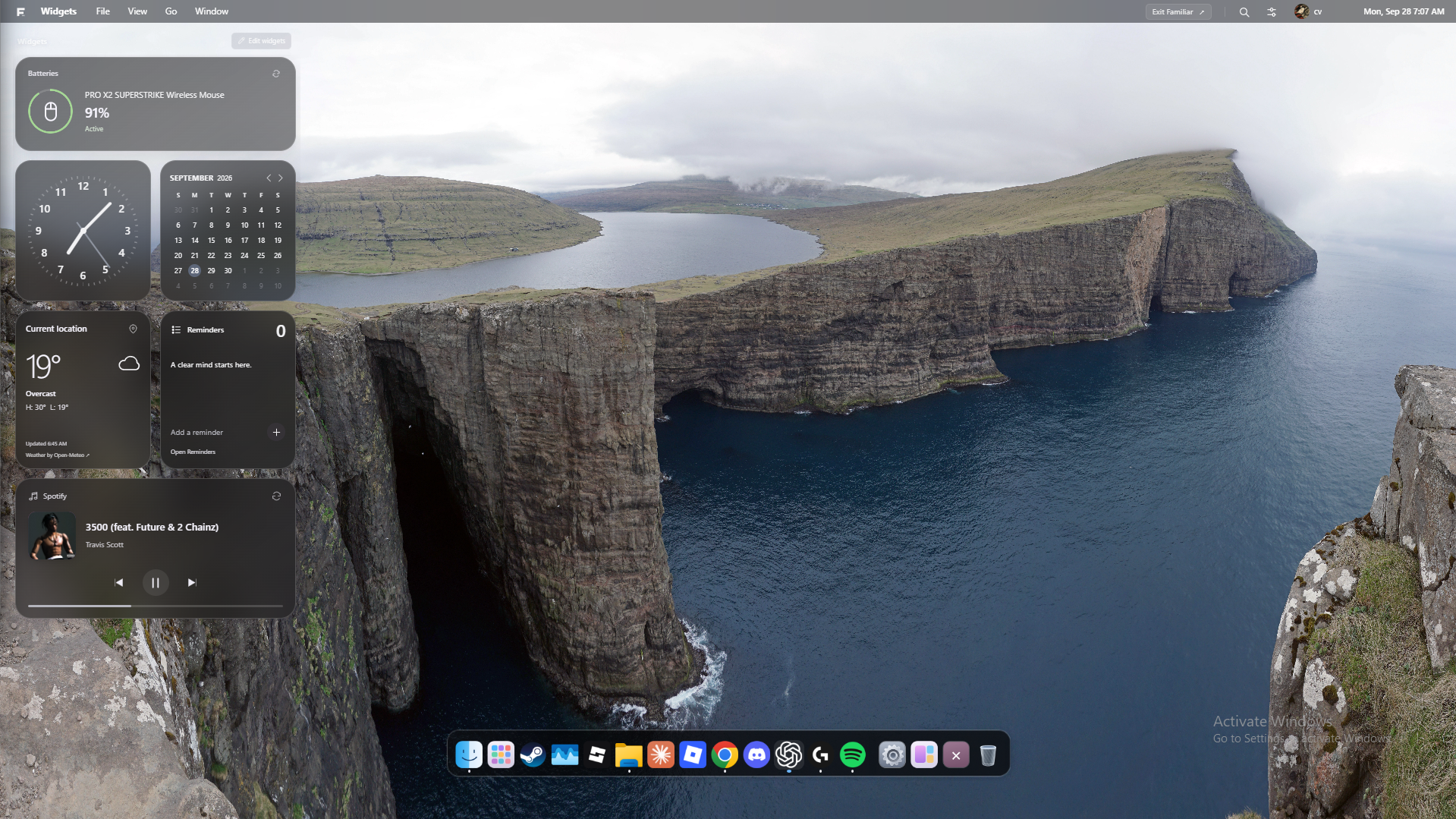
Familiar brings a Mac-inspired desktop to the PC you already use. A thoughtful dock, everyday widgets, and a space you can make your own. Underneath it all, your real Windows apps keep doing what they do best.
Explore Familiar in light and dark.
Dark appearance. Pacific Shore. A quieter kind of workspace.
01 / 02Your pinned favorites, running apps, and folders. Together, within reach.
Weather, reminders, your next song, and supported device batteries.
Open installed Windows applications and supported games. From the spreadsheet due tomorrow to the game you play tonight.
Choose a wallpaper, arrange your shortcuts, and create a local profile with its own name, photo, and preferences.
Find discovered apps and files in your open Familiar folder with Alt + Space. Keep the next thing close.
It started with a familiar university problem.
You’re comfortable on a Mac. Then your course needs a Windows PC. Suddenly, alongside learning your subject, you’re learning a different way to use your computer.
We’re building Familiar to make that transition feel natural. An independent project that gives Windows a calmer, more familiar starting point, while keeping the applications you came for.
Built around a change of computer.
Designed to feel like you.
Finance, architecture, engineering, and beyond. A familiar place to start when your course takes you to Windows.
A dock, a menu bar, and a desktop that make the new computer feel a little less new.
Make the computer you already have feel more considered, more personal, and more yours.
Familiar is a desktop companion that runs on Windows. It gives you a Mac-inspired place to open apps and organize your day. Windows remains your operating system, and your Windows applications keep their own interfaces.
Yes. Familiar discovers installed Windows apps and supported installed games, then opens them on your PC. Each application still has its own Windows requirements. Familiar doesn’t run macOS applications.
Familiar’s desktop shortcuts point to your existing files and folders. Removing a Familiar shortcut leaves the original in place. You can browse and open files in Familiar; file operations such as moving, renaming, or deleting still use Windows Explorer.
You can exit Familiar at any time from the menu or with Ctrl + Alt + Q. Your open Windows apps keep running. Advanced system settings may also open directly in Windows.
Profiles, reminders, and personal layouts are stored locally on your PC. Cloud sync and connected calendar accounts are not part of the current alpha. Device battery readings and media controls depend on supported hardware and apps.
Familiar is currently in early alpha, with development and testing underway. A public download and release date haven’t been announced yet. The screenshots on this page show the working app as it develops.
We’re refining the little things that make
a desktop feel right. This is just the beginning.